Thursday, January 15, 2009

Statute of Limitations On Image Copyright Infringement

I just found the following article at "Photo Attorney" at the below URL:

http://www.photoattorney.com/2005/05/dont-sit-on-your-copyright.html


What I get from this article is that if you had infringing images on your website, the statue of limitations starts when the images are removed, and/or when you receive a formal letter from the proven owner. I don't know the law, and assume the article below is accurate. It sounds like printed images are pretty different from Internet images! There is also the issue regarding the owner having to prove Copyright Registration PRIOR to the actual infringement.

May 26, 2005

Don't Sit On Your Copyright Infringement Claim!

When someone infringes your copyright, you have a limited time to make your claim. This is based on a legal principle called "statute of limitations." Statutes of limitation, in general, are laws that prescribe the time limit to file lawsuits. The deadlines vary by the type of claim and maybe by the state where you live. The purpose of them is to reduce the unfairness of defending actions after a substantial period of time has elapsed. They allow people to go on with their lives, regardless of guilt, after a certain time.

Because copyrights are governed by federal law, there is only one statute of limitations for claims related to them. Copyright infringement claims have a three-year statute of limitations from the "last act" of the infringement. What constitutes the last act can vary. For example, if your image is published in a newspaper without your permission, you have three years from the date that the newspaper was distributed to file your claim in court. But if the infringement is continuing, such as when someone is using your image on the web without your consent, then the time to calculate the statute has not started to run. Instead, it would start when your photo is removed from the website. Determining when a statute has started to run can get a bit tricky. It sometimes starts when you have "constructive" notice of the infringement, even if you don't have actual knowledge of it.

If someone uses your photo without your permission, you may seek legal remedy from that person within three years of the last act of infringement. So don't sit on your claim once you have it. Note, however, to pursue any copyright infringement claims in court, you must first register your copyright with the U.S. Copyright Office.

Take my advice; get professional help.
PhotoAttorney®

Wednesday, January 14, 2009

Cleansing your Internet Footprint From Google

So, your robots.txt file is intact and you have a hitlist for your content removal? Great, because we need to make some specfic declarations to Google now. If not, read earlier articles on Handling robots.txt Files To Block Search Engines and Web Archives and Preparing Your Plan To Cleanse Your Internet Footprints.

Before you can talk to Google, you must establish some authority for your site. Else, Google will think you're a nutjob looking to cause some problems. Google has a simple and effective way to let you prove your control over the web space in question. First, you need to Create a Google Account. You should see a form titled "Create a Google Account - iGoogle" where you will define a Google Email Address. If you already have one, you can skip this step.

With your Google Email Address, you can now Sign In To Your Google Account and get started. Prior to making any declarations, CHECK that your email account is working and that you can send and receive email with your new Google Email Account. Please make a paper record of your account login so you can return to it reliably during the Internet Footprint Cleansing process. No sense freaking out about stuff we should have total control over.

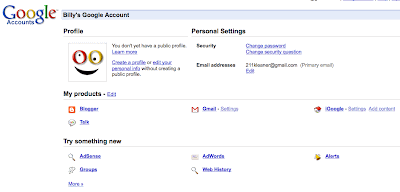
Now you are logged in, you should have a "Google Account" splash page with links below...This page no longer contains the link we need for the cleansing process. What we are looking for is the Google Webmaster Tools area. Click the preceding link and you should see a Get Started link on the upper-right, and you should click it.
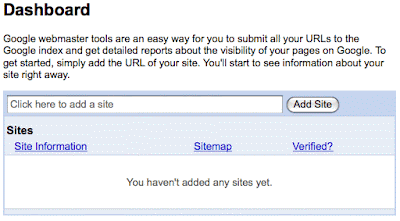
The next page should be a form letting you "Sign in to Google Webmaster Tools with your Google Account" and you should continue. The next page should be your Google Webmaster Tools Dashboard.Where it says, "Click here to add a site" you will enter the web address for the primary domain over which you have control. Having control means you can upload files to the root level. Google is pretty smart, so don't worry about forward slashes / and the use of http:// too much but do try to be correct, so we can move forward. Fro example, you could would enter your domain in the following format, using your own domain, of course:

http://www.thecheesecakefactory.com

You should see your domains and URLs show up in the list, like shown below. Obviously, your addresses won't be blurred out like mine. You must "add a site" for each domain you need to perform Internet Footprint Cleansing for.

Each site address on the left is a link to our next step in Google. Click on a site link and you'll see a yellow box stating that the selected site has not yet been verified. Google is asking you to prove that you have control over the web content.
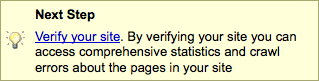

Click the "Verify your site" link. The next page offers a dropMenu to select your preferred method of verifying the site. You could opt to include a "meta tag" in the homepage of the site, or my preference, "upload an HTML file" with the name Google will supply. This latter method is easier, is less intrusive, and easier to manage on the file system. You may have removed your actual homepage, and may forget to add the meta tag to it when it returns. Copy the filename Google indicates, create a text file and name it whatever Google specified. Upload it to the "root level" of your site, next to where your homepage would reside. Return to the Google "Verify Site" page and click the "Verify" button. Google will instantly check your site for the file you just uploaded. Once they see the file is present, they will acknowledge you as having control, and we can continue.

Now, return to your Webmaster Tools Dashboard, where you see your list of domains. Click a verified domain to start the removal request process. The lefthand navigation should list as shown below...
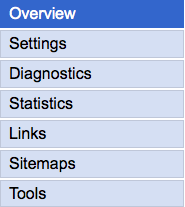
Click on Tools at the bottom. Your options are expanded from the Tools menu item as follows:

Overview
Analyze robots.txt
Generate robots.txt
Manage site verification
Remove URLs
Enhance 404 pages
Gadgets

You want to click the REMOVE URLS link, as we're wanting to ask Google to remove certain URLs (web addresses) from their index and caches for both web and images engines. Click the next "+ New Removal Request" button and you'll be prompted to relieve your ills within Google.

Here you must decide whether the removal is our entire site (triage mode), a directory with all enclosed content including other directories (mild freak-out mode), individual URLs (surgical approach), or simply a cached copy of a search result (casual and likely not you). I'm not an attorney or legal adviser, just some person. My personal recommendation here is to treat your removals like a cancer surgeon. Assuming you have an invasive carcinoma that might take your life (some crappy company has served you papers), you should cut out more than less to assure the cancer is removed (entire site or directory removal). If you have your ducks in a row, yet are reduced to a single round of ammunition, choose the shotgun!

Ah, crap! You removed something that should not have been removed? Relax, Google will let you "Re-include" removed content at least for awhile. If you are on the safe and friendly side of the fence, like me, I'd rather have to do some extra work to rebuild content and regain engine positions, rather than offend others or possibly fall into a position of liability. The choice is yours, at this point.

You can address BOTH Google Web Results as well as Google Images. Pay attention to your options and URLs, and treat images as images, and web pages as web pages. You should see your listings and/or cached content disappear from Google Search Results anywhere from one day to one week after making the request. Not all content will be removed at the same time, so be patient. Yes, that's not what you want to hear when you are in crisis mode, but you have plenty to address while Google does its work. Don't sit on your hands watching Google Search Results, move on to the next engine and don't return to Google until you've done everything in the Internet Footprint Cleansing list.

If you can contribute to this article for Google, please email me at 211kleaner@gmail.com so we can help everyone avoid problems and be compliant! Thanks!

Handling robots.txt Files To Block Search Engine And Web Archives

Assuming you have your hitlist in hand and are ready to start cleansing your Internet footprint, we should start with the robots.txt file. "What the heck is that," you may ask? The Wikipedia defines robots.txt file as follow...

The robot exclusion standard, also known as the Robots Exclusion Protocol or robots.txt protocol, is a convention to prevent cooperating web spiders and other web robots from accessing all or part of a website which is otherwise publicly viewable. Robots are often used by search engines to categorize and archive web sites, or by webmasters to proofread source code. The standard complements Sitemaps, a robot inclusion standard for websites.

In essence, your robots.txt file says, "Stay the heck away from this stuff, and/or you may look at this other stuff." Most engines are loyal to this method of keeping information sensitive. But, do not expect them all to adhere to the same moral ground as Google and Yahoo. If you have sensitive media, Intranet content to remain private, or could incidentally infringe on another with publicly accessible media, DO NOT RELY on the robots.txt file. This is just a tool, not a weapon.

For detailed information about robots.txt files, their use, and formatting, etc, you should visit The Web Robots Page and pay attention. For brevity, I'll explain the essentials and get you on your way. You can spark-up the laptop later to explore the finer elements of robots.txt files. Our goal here is to declare to search engines and web archives that you have content they must stay away from, not index, and certainly NOT CACHE.

if you are in triage mode and want to blanket your site with a rejection notice, you wil handle bild your robots.txt file differently than someone in less crisis who want a surgical approach. Yes, you can specifi specific pages, images, and all media types. Lets get Triage underway.

To ask everyone to stay the heck away from absolutely everything, you declare a simple statement in your robots.txt file. In your HTML Editor or Plain texxt Editor, create a file named "robots.txt" and it should start with absolutely nothing in it. Yes, a totally blank file. It should NOT be RTF format or some other format like a Microsoft Document. Just a plain .txt file. Enter the following content exactly as shown below...

User-agent: *
Disallow: /

The text above was bolded just for blog display, and if your file is Plain text, you won't be able to make it bold, italicized, or apply any other style to it. You're done creating your robots.txt file. Upload this to the "root level" of your web server and you're robots.txt file is ready to do some work for you. The "root level" just means right next to your homepage, not in a subdirectory within your site. Lower levels will not work and wil lbe ignored. you should be able to browse your robots.txt file by going to http://www.mydomainname.com/robots.txt and seeing the User-agent text above. If you see your file content, this stage is done.

if you are not in triage mode, you can specifiy whole directories and their entire contents, as well as specific files by name. The Web Robots Pages website has great information beyond the scope of this blog, and web surgeons should resource this page. The example, as shown below, illustrates 1) a directory called "cgi-bin" that should not be indexed, 2) an HTML file inside a "private" directory that should not be indexed, and 3) an image inside the "images" directory that should not be indexed. The first line "User-agent: *" means that ALL robots like Google, yahoo, and others are included, no exceptions.

User-agent: *
Disallow: /cgi-bin/
Disallow: /private/my-passwords.html
Disallow: /images/inappropriate-image.jpg

If you are not stressed or upset right now, don't restrict your guidance to this blog for robots.txt files! Visit The Web Robots Page and take your time. It could save your job, your business, and maybe your sanity. bear in mind that once posted, the robots.txt file will start to result in automatic exclusion from search engine indexing, web archiving, and image collection from your site. As well, previously indexed and cached content should start to disappear like you were never there. BAD ROBOTS will ignore the robots.txt file and continue indexing and caching regardless, and we think they suck! If it's sensitive information, get it off your public server right away and do some reading about what is public and what's private. If you are desperate, email me at 211kleaner@gmail.com and I'll help, time permitting.

Caveat: If Google or others revisit your site infrequently, your content wil lnot disappear until their next visit. Some sites are indexed only a few times a year, others every day. It's a great tool, but we must forge ahead aggressively and approach the engines and archives directly. Moving right along...

Preparing Your Plan To Cleanse Your Internet Footprints

There is a list of work to follow, but before we address the world, we need to address our local content. Hopefully you have identified what you want to prevent the world from seeing, including both expected and unexpected URLs. You could scour your web server file structures, look through your own code, or resource a programmer or web developer to get involved. Holy crap, that sounds exhaustive! Well, there's a faster madness to this method.

Before you start deleting external content, you should use it to your advantage. Go to Google and ask them what content they have indexed and cached. Google loves to share information and we're making use of this feature. Affectionately referred to as Google Hacking, we are simply using the available commands that the Google engine responds to, in an attempt to return empirical results.

Lets say your domain is http://www.extortionletterinfo.com and you want to know everything Google knows about your site. A novice Google user might use the keywords, "extortion letter info" and be happy with the results. My search just now returned "about 996,000" pages of search results, each page containing 10 web pages to review. Yikes, what the heck are we going to do? No need for caffeinated, doughnut-filled, sleepless nights. We turn to the art of Google hacking, coined and defined by Johnny Long whose website http://johnny.ihackstuff.com has been a fabulous Online resource for ethical hackers and hardcore Googlers over the years. He appears to be using Twitter for his site at http://twitter.com/ihackstuff, but that's not the point, just a resource. If you really want to learn more about Google hacking, pickup his book "Google hacking For Penetration testers" from your local book store.

Onward... An excerpt from Google hacking is the phrasing to get the results of all content for one specific website. We are asking Google, "Please show me everything for the website www.extortionletterinfo.com and no other domains or subdomains." A good start, but to be sure your domain is covered for all subdomains, we drop the "www." part get broader results.

If you have a specific subdomain of concern, and not all subdomains, include the subdomain to refine your search, such as "secure.extortionletterinfo.com" The text you submit to Google is exactly as shown below, no spaces and that's a semicolon between site and the address...

site:www.extortionletterinfo.com


Submit this phrase and Google will check its archives for all listings known under this domain and subdomain. My search just now returned "about 153" pages. To make life easier, we can ask Google to show us 100 results per page, so we only have 2 pages to handle in this case. The URL in the address field of my browser is:

http://www.google.com/search?hl=en&client=firefox-a&rls=org.mozilla%3Aen-US%3Aofficial&hs=hsD&q=site%3Awww.extortionletterinfo.com&btnG=Search

...so insert "num=100&" as shown below, and hit RETURN on your keyboard...

http://www.google.com/search?num=100&hl=en&client=firefox-a&rls=org.mozilla%3Aen-US%3Aofficial&hs=hsD&q=site%3Awww.extortionletterinfo.com&btnG=Search

Your results page will now have 100 results to review. Before you move on, or assume this will be around tomorrow, print the web page to PDF, and maybe print it if you like using paper. You need to make records of this stuff as you move forward and check-off files you have handled and see clearly what remains to be handled.

Note that not every listing in search engine results has been cached. This is a list of "indexed" pages, not necessarily pages where another can view your historical content. This doesn't mean you can leave it on your server, it just means you might have less work to do At the search engine. If the listing says "Cached" you know it's higher on your priority list.

At this point you now have a comprehensive list of what Google knows. Nice, but not enough. You mmust repeat this process with the top 4 search engines, which are Google, Yahoo, MSN Live, MSN Search, and Ask. The remaining hundreds of search engines are almost all parasitic on the search results of these primary four engines, else do not have enough impact on the Internet to be worried about. It'll be a little work to correlate which sites have what pages, but it's not the main goal. If you have been served a letter or legal paperwork, they probably state clearly what has caused and problem. Else, you are probably aware of what you need to remove of a sensitive or personal nature.

Holy crap, you thought your list was complte, but hey... we have to be sure your images list is ready too! Browse to http://images.google.com and try the site:www.extortionletterinfo.com search. This site has no indexed images. So, for an example, lets try another domain that does...

site:www.photobucket.com

Only "about 13,000" images here, but it tells you what Google has indexed for this site. Hopefully you know what you're looking for and this is a fast tool to see any images in need of removal. It may also aid those searching for images in websites suspected of infringement or improper use. Make notes by printing to PDF and/or printing to paper. This expands your hitlist well.

With these lists in hand, you are now prepared to forge ahead with cleansing your Internet footprint, and can keep your sanity during the process. That would really suck to start killing content and lose track of who, what, where and when.

Differentiating Browser Cache From Search Engine Cache

If you need to clear your cache, you must understand that "cache" is a generic term. My dog used to bury bones int he same hole, which was his "cache" of bones. Online, we refer to cache as a storage mechanism associated with various applications to make them faster. There are two prominent caches for Online users, one of which we don't care about, the other we really do...

Browser Cache, as defined by the Wikipedia...

Web caching is the caching of web documents (e.g., HTML pages, images) in order to reduce bandwidth usage, server load, and perceived lag. A web cache stores copies of documents passing through it; subsequent requests may be satisfied from the cache if certain conditions are met.

It is not to be confused with a web archive, a site that keeps old versions of web pages.

The last sentence leads us to our important interpretation of Cache, which is anything that is archived, as discussed below. Browser Caches give the impression that the Internet connection is much faster than it really is. By saving the text and images from your browsing history, you can return to the same pages and view the stored text and images, rather than downloading it again. You think you browsed the same site, but you really browsed the stored files in your browser. This causes a problem when you want to see the very latest information straight from the web server's mouth, not your old stored files. If so, hold down thr SHIFT key while clicking the Refresh/Reload button in your browser application. This should tell our browser to override the local file cache and collect the newest version from the server.

Now, do we care if your browser has stored old media? No! You won't get sued for having old content in your browser, and nobody should be able to view your local cache aside you. Lets move on to the important cache, which is Web Archives or Web Caches...

With a dissimilar goal from your browser, Online resources seek to archive your website, ftp server, and whatever they can get their hands into. We'll start with Google, the almighty brain and dominant intelligence in the world. When you browse to Google and perform a search, you get search results pages, which list titles, synopses, and some other information for each listing. If you look closely, you'll notice the term "Cached" and then "Similar Pages" at the bottom of each listing.


Go ahead and click the "Cached" link and read the statement at the top. There is a statement provide by Google telling you that what you're viewing is a "snapshot" from a,previous date, for the site listed in the search results page. I clicked the top link and Google states...

This is Google's cache of http://www.ultimatechocolate.com/. It is a snapshot of the page as it appeared on Jan 10, 2009 13:11:56 GMT. The current page could have changed in the meantime. Learn more

These search terms are highlighted: chocolate treats


This is pretty important stuff! Google visited this website and collected more than just the text. They collected the source code, text included, and all the reasonable images, style sheet, and Javascript code. We could ask if this is itself a Copyright Infringement, but we'll get into philosophical discussions elsewhere. Most companies WANT Google to index and archive their content, as part of helping the world find their site, buy their products, and create more revenues.

The down side is that Google may have archived something you are freaking out about. A Cease And Desist letter is enough to give the average person some minor brain hemorraging! Now you have found that Google continues to display your infringing or sensitive information and images seemingly forever, even after your own site was cleansed. Google is not alone in this handling of historical information, but the concern is how to get your content removed! I'll blog on this specifically, and individually. This page is intended to make sure you know the difference between types of caches, which I hopefully drove home.

The question at hand for most is how to get Google and other Online entities to delete all cached content from the past, while allowing them to continue caching in the future. We'll get into removal of specific pages, specific images, and future Google cache management and control.

What Is Internet Footprint Cleansing?

The Internet has become a vastly complex and varied array of information for the world to browse. Search engines and others have sought bandwidth reduction for speed and efficiency, as well as to create indexed archives for high quality searches. Some others have sought to record everything that exists Online, regardless of its duration or sensitivity. The result is an Internet Footprint, which is the content available through available Online mediums for specific entities. The result is also a problem for some.

Internet Footprint Cleansing is the process of erasing records of your content and Online impact. Why would someone want to do this? Well, it's simple and sometimes mandated. Our focus for starting this blog is to help those individuals and organizations who have been served some form of Cease And Desist letter for whatever reason. Here are some examples of who this blog applies to:

1. You received a Cease And Desist letter mandating you remove some form of Copyright Protected materials from the Internet.
2. Your materials turned out to be Copyright Protected, and you wish to avoid/prevent Copyright Infringements.
3. You discovered sensitive information has become public and wish to make it private again.
4. Your Intranet was exposed to the Extranet and you were indexed, creating a vulnerability for your organization.
5. Online content is invalid, out of date, inappropriate, or otherwise undesirable for public consumption.

Heck, this bog will apply to anyone who simply wants to get their content off the Internet for whatever reason. You don't have to be in a lawsuit to need Internet Footprint Cleansing. The caveats are that you need to prove control over the original content, as we'll discuss in this blog. If you are not in control of the exposed or released content, you are not liable. This is another discussion, which we'll get to further on. Right now, we have the issue of liability to mediate.

The Online resources that have the most impact are your own domain and web/ftp space, search engines, and archives. There are two approaches to these issues. The first is introspective, as you have content you can control such as your web and/or ftp server. The second relates to the Online mediums that you cannot directly control, but which will respond to your requests once you prove control over the original content. There are side issues we will explore as we blog, and we hope to get feedback from technical professionals and web-savvy users alike, to help everyone with a similar dilemma.

If you can contribute to our efforts, please send email to 211kleaner@gmail.com and we'll try to manage content here to maximize the general public's benefit. In case some crappy copyright manager at some company reads this blog and takes offense at this for its potential for damaging their income resulting from extortion letters, go away. This blog is for teaching the public how to effectively respond and comply with Cease And Desist requests related to Online media. Any comments, submissions, or any content otherwise included is in no way intended to infringe on another. If you have copyrighted any of this blog's content, send us your Registered Copyright documentation to the email address above and we'll respond appropriately.

Now, if this blog applies to you, read on and we hope it helps you!